
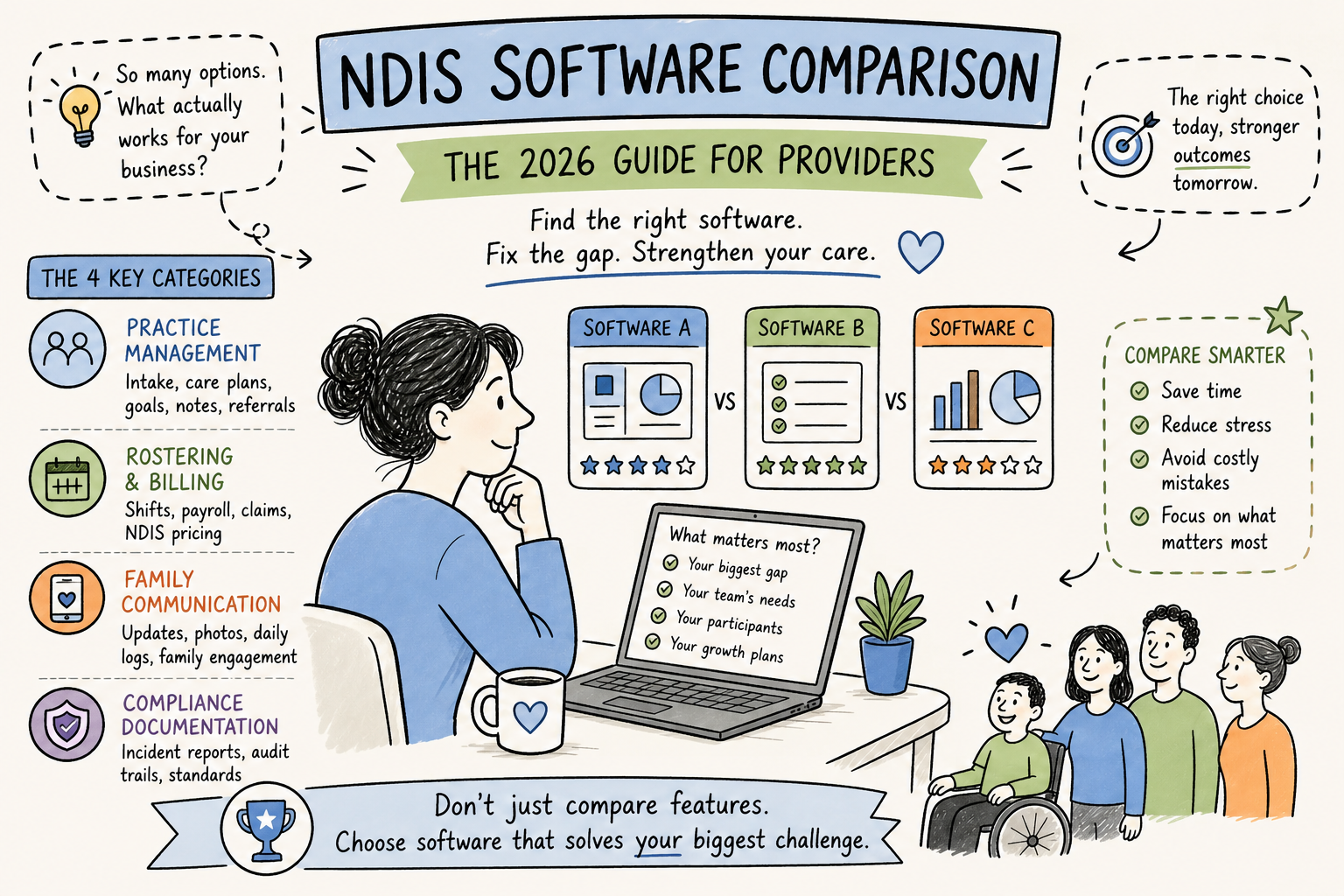
There is no shortage of NDIS software in 2026. FlowLogic, SupportAbility, Brevity, ShiftCare, Imploy, iinsight, Lumary: each platform claims to handle everything a provider needs, and each one has a feature list long enough to fill a whiteboard. Yet many providers still end up fielding family phone calls manually, patching gaps with WhatsApp, and scrambling to pull documentation together before an audit. This NDIS software comparison guide cuts through that noise by evaluating platforms by functional category rather than by feature count, because the software exists, and the problems persist.
The issue is not the software itself. The issue is how providers approach the comparison. Stacking 30 features side by side across eight platforms does not lead to a decision; it leads to spreadsheet paralysis. A more useful lens is to evaluate NDIS management software by functional category, because the best platform for rostering is rarely the best platform for family communication, and the best platform for care plans is almost never strong on audit-ready documentation. Understanding which category matches your biggest operational pain point is the fastest path to a confident shortlist.
This guide walks through each functional category so you can identify your gap, shortlist the right tools, and stop buying software that almost solves the problem. Most providers already have some operational software in place. What is typically missing is the layer that covers family communication and compliance documentation.
Why comparing NDIS platforms feature-by-feature leads you nowhere
Most comparison guides try to be exhaustive. They list every module, every integration, every support tier, and they end with a winner. That approach sounds helpful, but it ignores the most important variable: what your organisation actually needs most right now. A small home care provider with five participants needs something completely different from a multi-site residential facility managing 300 residents.
The four categories that define NDIS software
NDIS software sits across four distinct functional categories. Practice management covers participant intake, care plans, progress notes, goal tracking, and referral workflows. Rostering and billing covers shift scheduling, payroll, claims processing, and NDIS price guide alignment.
Family communication covers how providers share updates, photos, and daily logs with families and carers. Compliance documentation covers audit-ready records, incident management, and evidence of care delivery aligned with the NDIS Practice Standards. These categories rarely overlap cleanly inside a single platform, and knowing which one you need to solve first makes any NDIS provider software comparison infinitely more manageable.
Why provider size changes the equation
For solo and micro providers with fewer than 10 participants, simplicity and low entry cost outweigh everything else. Medium providers managing 10 to 100 participants need automation, reliable billing, and scalable workflows. Large multi-site organisations require enterprise-grade reporting, deep integrations, and consistent tooling across teams. No single platform is the best NDIS software for every size. The right choice depends on where your operation currently breaks down.
NDIS software comparison: practice management and participant records
A strong NDIS practice management system needs to handle participant intake, care plans, progress notes, goal tracking, risk assessments, and referral management without requiring staff to duplicate data across systems. This is the foundation layer, and if it is weak, everything downstream suffers.
FlowLogic invests heavily here: it covers care plans, goal tracking, risk assessments, live dashboards, and PRODA/PACE submission, see a roundup of what vendors market as the best NDIS software to understand how feature positioning differs across providers. Independent comparisons such as the NDIS software review 2025 can help you translate marketing claims into practical pros and cons for practice management workflows.
SupportAbility targets a similar layer with client intake, multi-site reporting, and automated NDIS pricing compliance. Both are strong in this category for medium to large providers. iinsight and Lumary also compete here, but with different strengths: iinsight suits support coordination software workflows, while Lumary targets larger organisations needing modular enterprise tools.
Key features to evaluate in participant management
When assessing this category, focus on four things: how easy it is to customise intake forms, how smoothly participant data flows into claims, whether goal and progress note workflows reflect how your staff actually work, and whether the system supports PRODA and PACE submission natively. Platforms that require manual export and re-entry for claims processing create exactly the admin burden they are supposed to eliminate.
What practice management software won’t cover
Even a strong NDIS case management platform often has no meaningful family-facing layer. Many platforms lack the tools for families to log in, see what happened during a visit, or receive a photo update from the care team. While a subset of platforms do offer family portals, the communication layer remains an afterthought in most practice management tools, and the audit trail for family communication is equally thin. For guidance on provider, participant engagement tools and communication features, see an overview of NDIS software communication tools.
NDIS software comparison: rostering and billing
Poor rostering and billing software does visible daily damage: missed shifts, payroll errors, incorrect NDIS claims, and SCHADS non-compliance. ShiftCare has reported admin time savings of close to 90% through cloud-based scheduling automation, a vendor figure, but a useful benchmark for what a well-configured system can deliver. Brevity and Imploy both combine rostering, shift matching, payroll integration, and automated claims in one place, making them strong contenders for providers who feel the daily weight of manual scheduling. Imploy also publishes resources focused on practice management options for smaller providers, see their guidance on best practice management software for small providers.
The billing accuracy problem and how software solves it
Manual rostering creates downstream billing errors that compound quickly: a shift logged at the wrong rate flows through to an incorrect claim, which then requires manual correction before PRODA submission. Platforms like FlowLogic address this with auto-updated price guide alignment, split invoicing, and bulk claims processing. ShiftCare handles it through recurring rosters, NDIS bulk invoicing, and timesheet integration. Xero integration has become a standard expectation for provider platforms rather than a premium add-on, for an overview of common approaches to Xero integrations see developer-focused write-ups that explain how financial tooling is connected to operational systems.
Pricing models: what to expect before you sign
The NDIS software market uses three pricing models. Per-user subscriptions are the most transparent: ShiftCare starts from around $9 per user per month, and RotaWiz offers comparable entry tiers from A$9 per user per month. Participant-based models like Vertex360 start from $31.50 per month and can work out cheaper for organisations with few staff but many participants, Vertex360 has commentary on affordable software for Sydney NDIS providers. Custom enterprise quotes cover FlowLogic, SupportAbility, and Lumary, where pricing is bundled with implementation and tailored to organisation size.
The hidden cost in custom-quoted platforms is onboarding. Diversity Sync’s published setup fee of around A$1,100 is a useful reference point for what implementation can look like when it is broken out separately. For enterprise platforms that bundle it into the quote, always ask what is included in setup and training before comparing total costs.
Family communication: the category most platforms quietly skip
Family communication is the most underdeveloped category in the NDIS software market, and it has the most direct impact on family trust, complaint rates, and staff burnout. Most NDIS disability support software has no real family-facing layer. Providers fill the gap with WhatsApp, personal phone numbers, and informal emails, which creates compliance risks, erodes professional boundaries, and leaves families feeling disconnected from their loved one’s care.
This is the gap TogetherDaily was designed to close. The platform allows care staff to share photos, daily logs, and structured updates directly with families from a single purpose-built tool, without relying on personal devices or consumer messaging apps. Secure two-way messaging keeps sensitive conversations professional and documented. Role-based permissions ensure families only see information relevant to their person, and real-time notifications keep them informed without interrupting active care shifts. For examples of digital tools built for NDIS care services, see industry vendors such as HelloPeople’s NDIS care services.
What good family communication actually looks like in practice
A support worker finishes a shift, opens TogetherDaily, sends a photo update and a brief daily log, and the family receives a notification within seconds. No phone call needed. No personal contact details shared. The family feels connected and reassured. The worker moves on without the interruption. Contrast that with the current reality for many providers: a family calls the office because they have not heard anything, a manager interrupts a staff member mid-shift to get an update, and the conversation goes unrecorded.
Why this category directly affects staff retention and family complaints
When families feel uninformed, they call. Those calls interrupt care staff, frustrate coordinators, and consume time that should go into direct support. Centralised, structured family communication can break that reactive cycle by creating a documented record of every update shared. That record is exactly what auditors look for when assessing whether communication practices align with the NDIS Practice Standards. Every photo sent, every daily log posted, every message exchanged becomes part of a verifiable record rather than a gap in your audit trail.
Compliance-ready documentation: what auditors actually check
NDIS Commission auditors are not just reviewing care plans and incident reports. They assess communication records: what was shared with families, when it was shared, by whom, and whether it aligns with the participant’s plan and their stated communication preferences. Most rostering and billing platforms create strong operational records but leave the communication layer entirely undocumented. That gap is a real audit risk.
Industry compliance guidance consistently points to time-stamped audit trails and centralised participant files as the foundation of audit readiness. TogetherDaily is designed so that communication logs, daily notes, and photo updates are stored in a structured, searchable format, meaning that when an auditor asks for evidence of how families were kept informed, the answer is a few clicks rather than a frantic search through email threads and text messages. See the NDIS Commission’s own Practice Standards and Quality Indicators and the NDS Interpretive Guide for how auditors interpret documentation and communication expectations.
The compliance features your software stack actually needs
A genuinely audit-ready stack requires time-stamped records for all communication, incident reporting workflows with escalation pathways, role-based access controls that limit data exposure, secure local data hosting, and alignment with the NDIS Practice Standards. CareMaster explicitly markets incident management and NDIS compliance support, their NDIS CRM software guide and compliance resources explain how incident workflows and records can be structured, but the communication layer still needs a dedicated solution to cover the full picture. Ticking the compliance box on rostering and care plans without addressing communication records is like locking the front door and leaving the back open.
For practical checklists, compare vendor materials such as CareMaster’s NDIS compliance checklist and independent resources like DayspringCare’s software compliance checklist to ensure your evaluation covers incident reporting, audit trails, and data handling.
Why Australian hosting matters more than providers realise
Many offshore or non-purpose-built platforms store participant data outside Australia. For providers operating under the NDIS Practice Standards and the Aged Care Quality Standards, local data hosting is a regulatory expectation. TogetherDaily is designed specifically for the Australian regulatory environment rather than adapted from a generic international product and retrofitted to local needs. If Australian data sovereignty is a requirement for your organisation, and for most NDIS providers it should be, confirm hosting location directly with any vendor during your evaluation, and consult updated guidance on policies and procedures such as the Avaana guide to NDIS policies and procedures.
How to run an NDIS software comparison for your organisation
Start with your single biggest operational pain point. Is it rostering chaos? Billing errors? Family complaints? Audit gaps? Match that pain point to the category it belongs in, then shortlist two platforms that cover that category well. For most providers, a two-tool approach covers the full picture more reliably than a single platform that stretches across all four categories without excelling in any of them. If you want another vendor perspective on market options and feature trade-offs, vendor overviews like ADTuna’s NDIS software guide can supplement hands-on trials.
A quick shortlist by organisation size
- Solo and micro providers (fewer than 10 participants): Imploy’s free plan or ShiftCare’s entry tier for operations and billing, paired with TogetherDaily for family communication and compliance documentation.
- Small to medium providers (10 to 100 participants): Brevity or ShiftCare for rostering, billing, and participant management, with TogetherDaily handling structured family updates and audit-ready communication records. For rostering best practice in hybrid work models, see analyses of rostering software for hybrid teams and vendor write-ups on rostering software.
- Large and multi-site providers: FlowLogic, SupportAbility, or Lumary for enterprise operations, with TogetherDaily as the communication and compliance documentation layer across all sites.
The questions to ask every vendor before trialling
Before committing to a demo or trial, ask each vendor these questions directly: Does the platform support PRODA and PACE submission natively? How stable is the Xero or MYOB integration? How does the system interpret SCHADS award rates? Where is participant data hosted? What audit trail does the platform generate for family communication records? These questions separate platforms built for Australian NDIS operations from those adapted from generic tools and marketed toward the sector. For practical insight into how project and financial tools integrate with accounting systems, see discussions about project management software that integrates with Xero.
Most platforms offer a free trial or demo window. Use it to test the specific workflows your team runs every day, not the polished demo scenarios the vendor controls. If the daily log workflow feels clunky for a support worker in the field, that friction does not disappear after onboarding.
The right NDIS software comparison starts with your own gaps
No single platform wins every category in 2026, and that is not a market failure. It reflects the genuine complexity of running a compliant NDIS operation across multiple functional areas. The comparison that matters is not platform versus platform, it is your organisation’s biggest gap versus the tool best suited to close it.
For many providers, the practice management and rostering layer is already partially solved. There is an existing system, even if it is imperfect. The gap that tends to remain open is family communication and audit-ready documentation: the layer that determines whether families trust you, whether staff feel supported, and whether your records hold up when the auditor arrives. If those are live pain points, that is where to focus your next NDIS software comparison, and why TogetherDaily was built specifically for the Australian NDIS and aged care environment. For additional sector guidance on quality and safeguards, consult the NDS NSW Provider Guide.
If you want to round out vendor research with user reviews, aggregated review sites such as G2 can provide real-world feedback, for example, see reviews of specialist education platforms like EDSBy on G2 or parent-facing apps such as the Parent App listings on G2 to understand common user pain points and strengths.